What is "Intel® Compute Stick" means

This is a desktop computer which is smaller than palm of your hand.
It design to plug in to any HDMI cable. You can plug it in to Monitor or to a TV.
This is the best computer if you have access to HDMI, smaller than laptop and weighted very much less than a laptop.
Only limiting factor is the memory, RAM is enough for smaller computing power and
if you guys using external HDD then the internal memory problem is solved.Additionally if you can keep files some where such as google Drive then you can access your data from anywhere since wireless access through Wifi.
The specification details for "Intel® Compute Stick" is shown below,
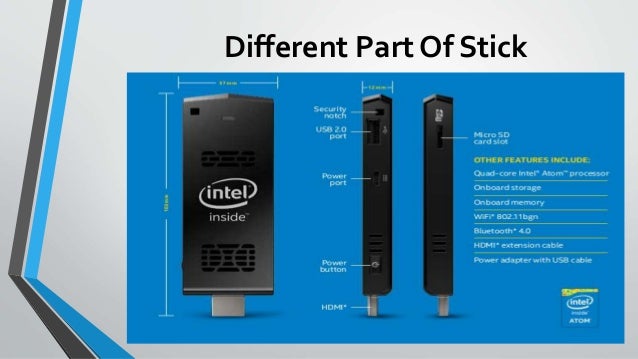
INTEL® COMPUTE STICK STK1AW32SC
Specifications
Windows 10 Home x86
Intel® Atom™ x5-Z8300 Processor
RAM 2GB DDR3L-1600
32GB storage
2 x USB 2.0
1 x USB 3.0
HDMI 1.4b
Intel® Wireless-AC 7265
Bluetooth 4.2
INTEL® COMPUTE STICK STK1A32SC
Specifications
None Pre-Installed Operating System
Intel® Atom™ x5-Z8300 Processor
RAM 2GB DDR3L-1600
32GB storage
2 x USB 2.0
1 x USB 3.0
HDMI 1.4b
Intel® Wireless-AC 7265
Bluetooth 4.2

This is a desktop computer which is smaller than palm of your hand.
It design to plug in to any HDMI cable. You can plug it in to Monitor or to a TV.
This is the best computer if you have access to HDMI, smaller than laptop and weighted very much less than a laptop.
Only limiting factor is the memory, RAM is enough for smaller computing power and
if you guys using external HDD then the internal memory problem is solved.Additionally if you can keep files some where such as google Drive then you can access your data from anywhere since wireless access through Wifi.
The specification details for "Intel® Compute Stick" is shown below,
INTEL® COMPUTE STICK STK1AW32SC
Specifications
Windows 10 Home x86
Intel® Atom™ x5-Z8300 Processor
RAM 2GB DDR3L-1600
32GB storage
2 x USB 2.0
1 x USB 3.0
HDMI 1.4b
Intel® Wireless-AC 7265
Bluetooth 4.2
INTEL® COMPUTE STICK STK1A32SC
Specifications
None Pre-Installed Operating System
Intel® Atom™ x5-Z8300 Processor
RAM 2GB DDR3L-1600
32GB storage
2 x USB 2.0
1 x USB 3.0
HDMI 1.4b
Intel® Wireless-AC 7265
Bluetooth 4.2
Comments
Post a Comment